Posts

Facebook releases 500 pages of damage control in response to Senators’ questions

When Mark Zuckerberg appeared before Congress in April, the CEO faced a public grilling from lawmakers — and left them with several lingering questions. Now, Facebook has followed up with 500 of pages of answers to written questions from two Senate committees, although some of the responses may be cause for even more digging.

In the documents, Facebook strikes a cautious tone as it answers questions about the Cambridge Analytica scandal, ad targeting, moderation policies, and more, giving a broad, if shallow, look at the company’s policies and practices. The documents seem, by design, to shed little new light — many of the questions are answered by pointing to publicly available policies, or through answers the company has previously offered. 

And while Zuckerberg’s in-person testimony was already highly polished, the written questions have reached a flawless sheen. In response to some of the most pointed queries, the company offered replies that obfuscated the issues. Responding to a question about how ads might be used to exclude people with certain characteristics, for example, Facebook explained that it did not offer targeting based on “race” but on “multicultural affinity” — still a controversial practice.

When asked about “shadow profiles” — the idea that Facebook follows non-users, which became one of the most explosive topics during Zuckerberg’s testimony — the company said it does not create “profiles” for non-users but admitted it “may take the opportunity to show a general ad that is unrelated to the attributes of the person or an ad encouraging the non-user to sign up for Facebook.”

Some of the issues where Facebook didn’t quite provide a full response may ultimately provide the biggest revelations. After replying affirmatively to a series of specific questions about what information the company tracks, Facebook did not give a simple yes or no when asked whether it tracks “every IP address ever used when logging into Facebook.” Instead, the company pointed to a vague “retention schedule”:

Facebook automatically logs IP addresses where a user has logged into their Facebook account. Users can download a list of IP addresses where they’ve logged into their Facebook accounts, as well as other information associated with their Facebook accounts, through our Download Your Information tool, although this list won’t include all historical IP addresses as they are deleted according to a retention schedule.

Facebook did provide more information about what kind of data the platform gathers — and the scope of that collection may surprise some. The company notes that it tracks “operations and behaviors” on devices, including “whether a window is foregrounded or backgrounded, or mouse movements (which can help distinguish humans from bots).” Device signals, settings, and “unique identifiers” are also tracked.

Facebook also followed up in areas where Zuckerberg’s testimony was wanting. The CEO struggled to name a single competitor during hearings, but in writing the company rattled off a long list of services such as Snapchat, YouTube, Twitter, Pinterest, Vimeo, and others — though those services are still, at best, partial replacements for the Facebook experience. 

Zuckerberg similarly wavered during testimony when asked whether Facebook would extend Europe’s GDPR privacy protections to the United States. In the written response, the company contends that the “controls and settings that Facebook is enabling as part of GDPR are available to people around the world.”

Other written questions veered off-track from privacy issues. During the Zuckerberg hearing, Sen. Ted Cruz asked a line of questions about an alleged anti-conservative bias at Facebook, and followed up in writing with dozens of pages of questions that turned bizarrely specific: “Nathaniel Friedman, an author at GQ magazine, stated that ‘Taylor Swift’s cover of “September” is hate speech.’ Does Facebook agree?” The company responded with a broad answer about its hate speech policy.

In the two months that it took Facebook to deliver these responses, more questions around Facebook’s data sharing policies have emerged. Just last week, a New York Times report suggested that the platform had shared user data with over 60 device makers, and that a bug had potentially set 14 million users’ private Facebook posts to be publicly viewable. The steady stream of bad headlines suggests Facebook’s efforts to address concerns are being outpaced by its own scandals. 
Netwise News Social Media

Ten reasons why YOU need video on your website

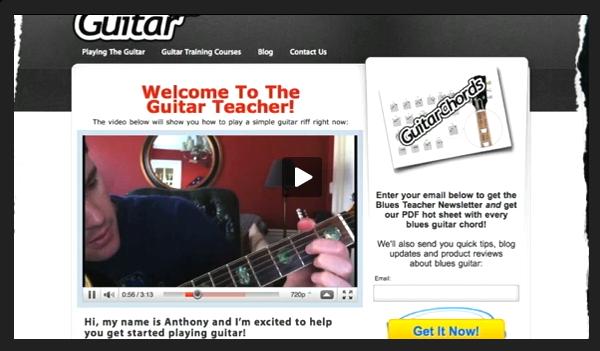
landing-page-videoMore often nowadays we are seeing video clips on business websites. They shouldn't be too long; the viewer will get turned off by 50 minutes of "why we are great" and "here's a description of everything we sell".

Short (30 second) infomercials are the current thing. Almost everyone has, or knows someone with, a camera that takes short video clips (even cheap mobile camera phones).

Uploading to YouTube is usually the first option but it looks more professional to embed video into your own pages and obviously without an advert appearing for your competitors.

Here are a few reasons why you should consider a video clip on your webpages:

  1. Video proves your track record - Video testimonials from satisfied customers prove you are exactly as good as you say you are. These videos help provide a 'second opinion' of you and it is this opinion that your prospects want to hear: not yours. The emotions that can be put across on video with how much you have made a difference to them can not be taken from text on a website and becomes a powerful persuasive sales tool.

  2. Video proves your professionalism - If your business is about you and your staff, how are potential clients supposed to know what you are like as people? if you are professional? if you are friendly? if you would be easy to work with? Video shows exactly what you are like. In staff interviews we ask questions that allows you to show off your professionalism & expertise as well as adding your personality (and sometimes sense of humour). REMEMBER people want to buy from people, not a faceless company.

  3. Video is fast and effective - The average 'window shopper' only stays on websites for around 30 seconds to browse through a website. In that short amount of time video can explain who you are, what you do and the benefits of using you whilst introducing staff members and showing off your facilities, products or services in practice. Can your website do that in 30 seconds?

  4. Video is versatile - You can use your video in several different places: your website, YouTube, social media, in email, as DVDs or QR codes in direct mail, in presentations, on screens at exhibitions, on loop in receptions, point of sale displays and more!

  5. Video saves you money - A salesperson's expenses can be very costly over the course of a year. Using a video can substantially decrease your cost per customer contact as people can see the benefits of products, services or facilities without you having to come out and perform a demonstration or paying for a client to come to you.

  6. Video saves you time: Video is a great way of getting rid of some 'time wasters', meaning instead of sending a salesman to every cold lead, send a video they can watch first with a call to action on it. This means anyone who gets in touch afterwards is a serious prospect.

  7. Video lets you sell globally - You can reproduce the video message in any language, via voiceover or subtitles and this allows you to promote yourself to a global market. You can even change accents to voiceovers to target different areas in the same country or different countries that speak the same language.

  8. Video shows you as a modern, forward thinking company - Video is the future of marketing as it is a medium people now prefer. would you rather watch a 60 second video or read 5 pages of text?

  9. Video can be offer extra income - if you provide training or organise seminars / conferences, you can make extra income for your company by letting people who didn't have chance to attend your training event by selling them an exclusive video instead.

  10. Video now offers value for money: Video is now affordable to most companies as due to the advancement of digital technology, production takes half the time so it now has half the cost! 

If you would like more information on how to embed professional looking video into your website, give us a call.

Netwise News Website Design

Website Contact Page Tips

contact-usYour homepage is your website's most important page. Your contact page is the second most important.

OK, well for e-commerce/shopping cart sites it might be the third or fourth most popular page, but either way your contact page is jolly important. The ultimate purpose of many sites is to encourage potential customers to make contact with you. Think of your contact page as a lead generation form.

The key to a successful contact page is simplicity and accessibility. It's important to include clear contact details. Adding an email link is often a good way to go, but if you want to elicit further information, then you need to be sure you have a great contact form.

1. Keep contact forms short and simple

It's really tempting to require users to fill out every bit of information about what they are looking for and what they need from you. While this info would be great to have, the longer your form is, then then less likely it is that anyone will fill it out.

2. Be friendly

Contact forms generate user engagement: this is the first thing that should be considered with respect to contact forms. Don't order people around or DEMAND. Say please and thank you and all the good stuff your mum taught you.

3. Be yourself

Don't just copy a form from a website you like or a competitor. Make your questions relevant to your product and your company. Be personable and try to connect with your website viewers.form field

contact-field4. Place labels on top of fields

For best results, locate labels like this:

5. Use informative error messages

Test your form when people miss bits out. Give them precise instructions on what form field pages.

For example, "There was an error processing your credit card; we were unable to verify your card number. Please check your name, credit card number, and card expiration date for correctness. Remember, these must match the card exactly."

6. Have a call to action at the bottom of every page

You want as many pathways to your contact page as possible. So always put a call to action at the bottom of every page. After the body copy put something like "If you'd like to know more about XYZ, then contact us today." Link to your contact form whenever possible.

In Conclusion

View further reading about Webform Useability or check out, CForms, one of the best WordPress form plugins.

After you've gone to all the effort of making a great contact page and form, then be sure to reply to people quickly. Surveying has shown that the longer you leave your reply the colder things will go.

Contact forms can either make a website usable or unusable, because they stand in the way of the user achieving their goal: reaching you. You wouldn't leave your shop front door half open and the shop lights off, now would you?

Netwise News Website Design

Designing a Landing Page

website-landingThe Christmas shopping has begun. People are searching for the best deals and are purchasing more than they have all year. Online advertising can be a great tool in order to get the word out about your special offers and landing pages can be a great tool to help those eager customers convert. Let's start with the basics.

A landing page is, in the most general form, a page that a visitor views after clicking on a link. This could be your home page or any other page on your site, but I would like to focus on custom pages. We previously discussed why landing pages are so valuable and how they help direct a visitor to complete your end goal.

Custom landing pages are especially useful after a customer has expressed interest by clicking on your advertisement. Landing pages are most useful for banner ads, email campaigns, and especially Pay-Per-Click advertising using Google Adwords. The page customers are sent to after clicking on your advertisement can be a page designed to fit customer needs based on the ad they clicked.

An effective landing page could dramatically increase the amount of conversions on your site. Conversions refer to the number of people who turn from a website visitor into a customer or at least get a step closer to becoming a customer. A conversion can be anything from signing up for a newsletter to purchasing your product. Basically, more conversions result in more customer so designing an effective landing page is essential.

The first step to creating a high quality landing page is to keep it simple. Focus the entire page on one goal, such as getting the visitor to fill out a form with contact information. The benefit of designing a custom landing page is that it can be much more simple than your website pages. Websites commonly have a lot information and give many options of where to go next in hopes that a visitor will stay on the site for a long time and view many pages. Keep the visitor focused on your goal by providing only the necessary information.

When a person is taken to a landing page the goal will be (and should be) obvious. The customer will realize that you want information from them in hopes that they may one day be a customer. They can see that you are benefiting when they convert so they are much more likely to convert if they benefit also.

Offering an incentive is a great way to get customers to convert without hesitation. A great way to get your landing page visitors to convert is by offering a coupon. Let's say you are running a banner ad campaign for athletic shoes. The text on the banner ad could something like "Click here to receive 25% off your shoe purchase." Then the landing page could include a form where potential customers write their email address so you can email them the coupon. Once they have filled out their information they can be taken to your website to begin browsing shoes and you now have the contact information for a potential customer.

Landing pages can be linked to a vary of advertising campaigns, but they should customized for each segment of customers. If your company is large, or targets a variety market segments then multiple landing pages should be created with the product or market segment in mind. When running a PPC campaign, you can tell Google which landing page to link to depending on the keyword that is selected. Make sure you keep in mind where visitors are coming from in order to link to a successful landing page.

You now have the tools necessary to create a high quality landing page yourself or if it seems like too much work then you can hire a web team to create a custom landing page for you. No matter who creates your landing page, ensure that it will be effective before linking it to your advertising campaigns.

Netwise News Website Design